
I went looking for an honest automation pricing guide written for Canadian small business owners. Something a dentist in Kelowna, a landscaper in Mississauga, or an accountant in Halifax could actually use to figure out if this is worth their money. I searched every combination I could think of.
It does not exist.
What I found instead: vendor content written in USD, SaaS companies pitching monthly subscriptions, and agency websites that will not quote a price until you book a call. There is not a single Canadian guide that gives you a real number in CAD, explains what you actually need, and tells you honestly when automation is not worth it.
So I wrote one.
Why Automation Pricing Is So Confusing
There are three reasons nobody will give you a straight answer.
First, most content about automation is written by the companies selling it. Their job is to convince you the software pays for itself, not to help you understand whether it fits your situation.
Second, the guides that do exist are written in USD. They reference American pricing, American tax incentives, and American market conditions. Canadian businesses face different realities: GST and HST compliance requirements, different payroll thresholds, and a smaller talent pool for technical implementation.
Third, the real cost of automation is not just the tools. It includes everything that surrounds the tools: the cleanup, the testing, the training, the compliance review, and the ongoing maintenance. That number is almost never quoted upfront.
The result is that most business owners either dramatically underestimate what automation costs or dramatically overestimate it. Both lead to bad decisions.
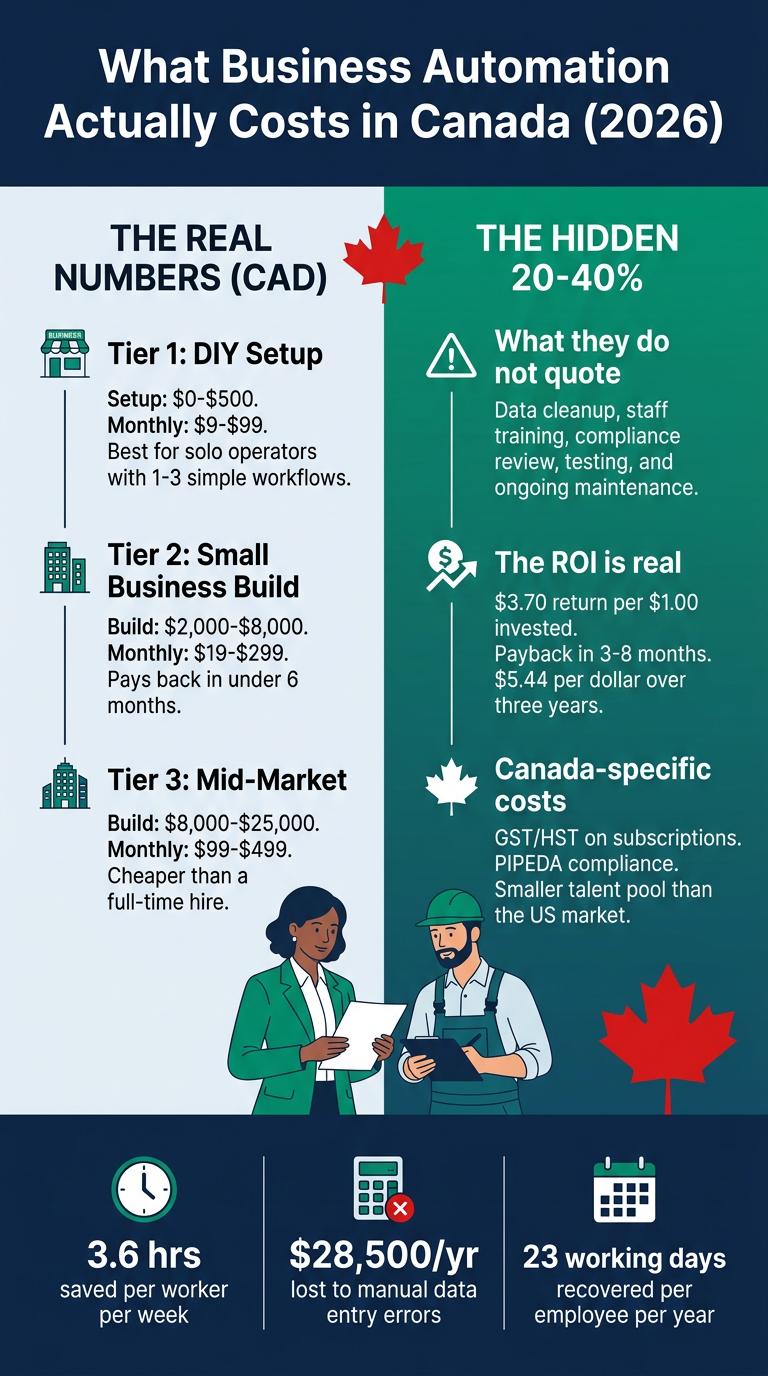
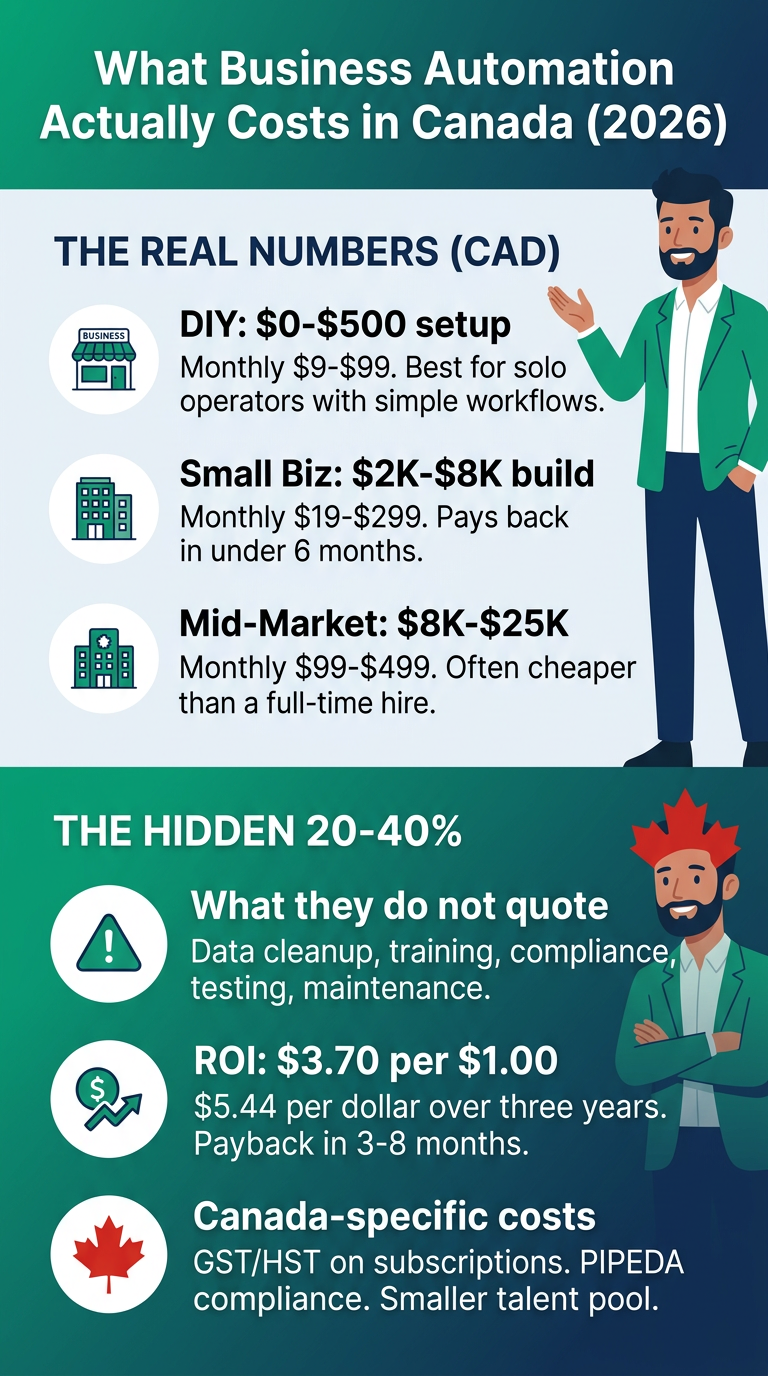
What Automation Actually Costs in Canada (CAD)
Here is a straight breakdown by business size and approach. These are 2026 figures based on real project work and current Canadian market rates.
Tier 1: DIY or Very Basic Setup (1 to 3 Workflows)
Who this is for: A solo operator or very small team who wants to automate one or two specific tasks. Booking reminders, simple contact form responses, basic spreadsheet syncing.
Setup cost: $0 to $500 CAD. If you are technically comfortable, you can configure most basic automations yourself using free tiers of available tools.
Monthly tool cost: $9 to $99 CAD/month, depending on how many tasks you need to automate and which platform you use.
Time investment: 4 to 10 hours to set up initially, plus ongoing troubleshooting as things break or change.
Honest note: This tier works if your process is simple and you are willing to learn. If your process has exceptions, involves multiple people, or touches your accounting or CRM, DIY usually creates more problems than it solves.
Tier 2: Small Business Build (1 to 10 Employees)
Who this is for: A small business that has identified specific manual bottlenecks and wants a professional to build reliable, tested workflows.
Build cost: $2,000 to $8,000 CAD depending on complexity.
Monthly operating cost: $19 to $299 CAD/month for the tools required to run the automations.
What this typically covers: Lead capture and follow-up, appointment scheduling, invoice generation, client onboarding sequences, or internal reporting workflows.
Timeline: 2 to 6 weeks from scoping to live.
Honest note: This is the right tier for most small businesses that have a clear problem to solve. The ROI math usually works out. A business losing 3 hours a week to manual data entry is losing roughly $7,500 to $15,000 a year in productive time at typical Canadian wage rates. A $4,000 build that eliminates that pays back in under six months.
Tier 3: Mid-Market Build
Who this is for: A company with more complex workflows, multiple departments, or systems that need to talk to each other. Think multi-location businesses, companies with dedicated operations staff, or teams dealing with high volume data processing.
Build cost: $8,000 to $25,000 CAD.
Monthly operating cost: $99 to $499 CAD/month.
What this typically covers: Multi-step approval workflows, ERP or accounting software integrations, custom reporting dashboards, or cross-platform data synchronization.
Honest note: At this tier, the build cost is real but the alternative is often a full-time hire. An automation specialist in Canada earns $45,000 to $85,000 a year plus 32 to 42 percent in benefits overhead. The math for automation at this level is often very clear.
Tier 4: Agency Retainer
Who this is for: A business that wants ongoing automation support, continuous improvement, new workflow builds, and someone to maintain everything as the business changes.
Monthly cost: $2,000 to $10,000 CAD/month.
What you get: Ongoing builds, monitoring, troubleshooting, and strategic input on where automation fits next.
Honest note: Retainers make sense when your business is changing fast enough that you always have new things to automate, or when the cost of a workflow breaking is significant enough that you want proactive oversight.
The Hidden Costs (The 20 to 40 Percent Rule)
Here is the number almost nobody quotes when they pitch automation: the hidden costs typically run 20 to 40 percent of your total first-year investment.
Data cleanup. Most businesses discover, partway through an automation build, that their existing data is a mess. Duplicate contacts, inconsistent formats, incomplete records. Automation cannot run on bad data. Cleaning it up takes time, and time costs money.
Staff training. Your team needs to understand what changed, why it changed, and what to do when something does not work as expected. A well-built automation that nobody understands will be bypassed within two months.
Compliance review. Canadian businesses operating in regulated industries, or handling personal information, need to confirm that their automated workflows meet provincial and federal requirements under PIPEDA and relevant provincial privacy laws. This is not optional, and it is often not free.
Testing and iteration. Good automation gets tested before it goes live. Real testing takes time. It also reveals edge cases that require changes, which take more time.
Ongoing maintenance. Software updates, API changes, and business process changes all break automations that used to work. Budget for maintenance as an ongoing line item, not a one-time cost.
A $5,000 build with $1,500 in hidden costs is still a good investment if the ROI is there. But a business that budgets $5,000 and then faces $2,000 in unexpected costs will feel burned, even if the economics were sound from the start.
When Automation Is Not Worth It
This is the section nobody writes, because nobody selling automation wants you to read it.
When the process runs fine as is. If a manual process takes 30 minutes a week, works reliably, and the person doing it has no complaints, automating it is probably not worth the cost. Not everything that can be automated should be automated.
When you do not yet understand the process yourself. Automation locks in a process. If your process is still evolving, or if different people do it differently each time, automating too early will lock in inconsistency. Document and stabilize the process first.
When the volume does not justify the investment. If you send 10 invoices a month, an automated invoicing workflow is probably not worth a $3,000 build. If you send 200, it almost certainly is.
When the cost of errors is low. Automation introduces its own failure modes. If the cost of an automation glitch in your business is high (missed client appointments, incorrect invoices, regulatory filings), the QA and monitoring requirements add significant cost. Sometimes manual review is cheaper and more reliable.
When your team does not have capacity to implement it. A new automation system requires focus during rollout. If your business is in a high-demand period, a transition mid-season is rarely worth it.
What the ROI Actually Looks Like
For businesses where automation does make sense, the numbers are strong.
An IDC study found a return of $3.70 for every $1.00 invested in AI automation. Typical payback periods run 3 to 8 months for small business implementations. Nucleus Research found that marketing automation specifically returns $5.44 per dollar over three years, with payback under six months.
The most common direct savings come from three places. Time: Slack's State of Work study found that workers using automation save an average of 3.6 hours per week, which works out to roughly 23 working days per year per employee. Errors: manual data entry errors cost the average business approximately $28,500 USD per employee per year in corrections, rework, and downstream problems. Lead response time: businesses that follow up with leads within 5 minutes are 9 times more likely to convert. An automated follow-up sequence runs at any hour without staff involvement.
How to Figure Out What You Actually Need
Before you talk to anyone about automation, spend 30 minutes answering these four questions.
What task do you personally dread most? The thing you put off, the thing that always falls through the cracks, the thing that takes longer than it should. That is usually the highest-value automation target.
What does a mistake in that process actually cost you? In real dollars, lost clients, or hours of recovery. If the number is significant, the ROI math for automation usually works.
How many times does that process happen per month? A process that happens twice a week is a much better automation candidate than one that happens twice a year.
Do you currently have clean, consistent data in that area? If the answer is no, that is not a reason to avoid automation. It is a reason to build data cleanup into the project scope and budget.
If you can answer those four questions clearly, any competent automation consultant can give you a realistic estimate within an hour.
What a Process Audit Tells You
If you are not sure where to start, a process audit is the right first step. It is not a sales call disguised as a consultation. It is a structured look at where your business loses time, money, and leads, and an honest assessment of which of those losses are worth automating.
I run process audits for Canadian small businesses across industries. You leave knowing which processes are worth automating, a realistic budget range in CAD, which tier makes sense for your situation, and which processes you should leave alone.
No obligation, no pressure, no package pitch. Just an honest look at the numbers.