
You've read the articles. You know that ChatGPT, Perplexity, and Google's AI Overviews are changing how people find businesses. You understand that Answer Engine Optimization matters. But you're running a business, not a marketing department.
The question isn't whether AEO is worth doing. It's whether you can set it up once and let it run without thinking about it every day.
The answer is yes. I know because I built that system for my own business. And it runs while I sleep.
The Problem: AEO Advice Assumes You Have a Marketing Team
Most AEO guides tell you to "create comprehensive FAQ content," "optimize your schema markup," and "build topical authority through consistent publishing." That's solid advice if you have a content team, an SEO specialist, and a web developer.
Most Canadian small businesses have none of those. According to a 2025 survey by Acquia of over 500 marketing professionals, only 20% have implemented any AEO strategy at all. Not because they don't believe it matters. 70% said they expect AEO to significantly impact their business within three years. The gap isn't awareness. It's bandwidth.
You're a contractor on a job site. A salon owner between clients. A clinic manager juggling intake and billing. You don't have four hours a week to write FAQ pages and audit your structured data.
That's where automation comes in.
What an AEO Automation Stack Actually Looks Like
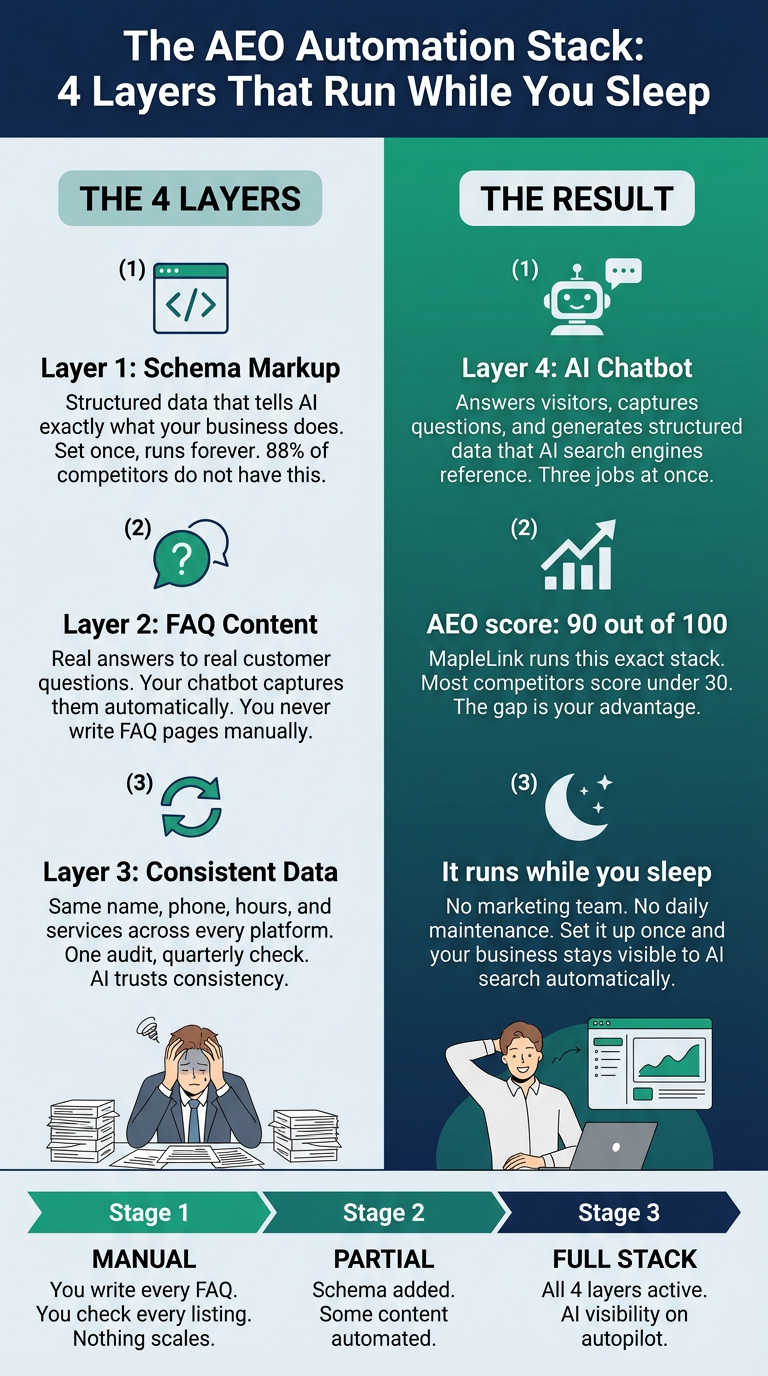
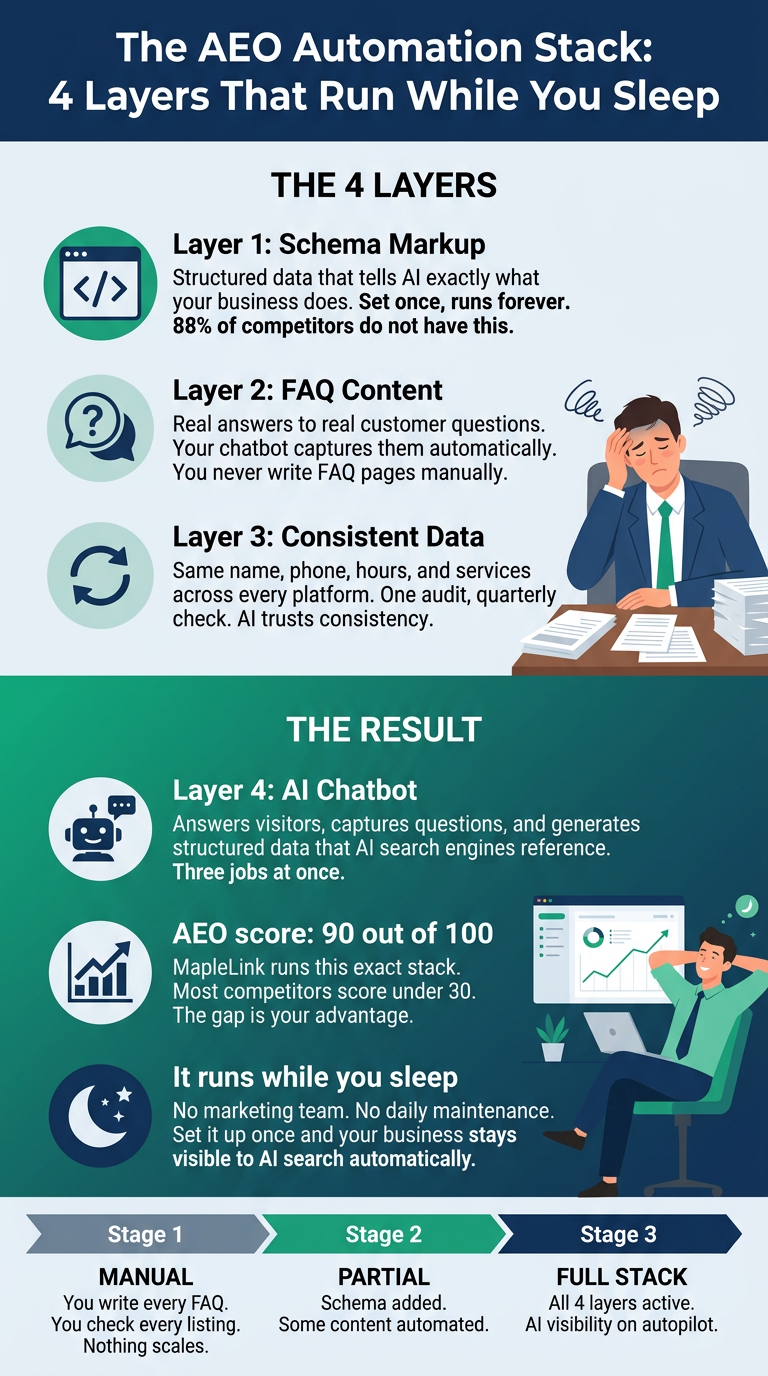
Think of AEO as four layers. Each one can be set up once and left to run with minimal maintenance.
Layer 1: Schema Markup (Set Once, Runs Forever)
Schema markup is structured data embedded in your website that tells AI exactly what your business does, where it operates, what services it offers, and how to contact you. It's invisible to visitors but critical for AI engines.
Here's the thing most business owners don't know: only about 17% of all websites use any structured data at all. That means over 80% of your competitors are invisible to AI at the data layer. Just adding basic LocalBusiness schema puts you ahead of the vast majority of businesses in your market.
The impact is measurable. Businesses with complete LocalBusiness schema appear in Google's Local Pack 2.7 times more often than those without it. Schema-enriched listings see significantly higher click-through rates than unmarked equivalents.
You set this up once. It doesn't change unless your business information changes. If you're on WordPress, a plugin like Rank Math or Yoast handles it. If you're on a custom site, a developer can add it in an afternoon.
Layer 2: FAQ Content That Maps to Real Questions
AI engines pull answers from content that directly addresses the questions people ask. Not blog posts about your company history. Not generic service descriptions. Specific answers to specific questions.
The automation angle: you already know what your customers ask. Every phone call, every intake form, every email has a question in it. The system I built captures those questions automatically through chatbot conversations and lead intake forms, then flags the ones that come up repeatedly. Those become FAQ entries.
You don't need to sit down and brainstorm questions. Your customers are already telling you what they want to know. You just need a system that listens.
Layer 3: Consistent Business Data Across Every Platform
AI engines cross-reference your information across sources. If your website says you're open until 6 PM but your Google Business Profile says 5 PM, that inconsistency reduces the AI's confidence in recommending you. If your phone number is different on Yelp than it is on your site, that's another trust signal lost.
This is a one-time audit. Check your business name, address, phone number, hours, and service descriptions across your website, Google Business Profile, industry directories, and social profiles. Make them identical. Then set a quarterly reminder to verify nothing has drifted.
In Canada, the key directories to check are Google Business Profile, Yellow Pages Canada, Canada411, and any industry-specific listings (HomeStars for contractors, Booksy for salons, Healthline for clinics).
Layer 4: A Chatbot That Generates Structured Data While It Works
This is the layer most people don't think about. A properly built AI chatbot on your website does three things at once:
- It answers visitor questions in real time (lead capture). 2. It generates a log of exactly what potential customers are asking (content intelligence). 3. It creates structured, AI-readable conversation data that search engines can reference (AEO fuel).
I built a chatbot for MapleLink that runs on Claude AI. It answers questions about services and pricing, captures lead information, and logs every conversation. Those conversations tell me exactly what content to create next. The chatbot feeds the content strategy, which feeds the AEO, which brings more visitors to the chatbot. It's a loop that runs itself.
What I Built for MapleLink (And What It Does While I Sleep)
I'm not writing this from theory. I built this stack for my own business and I can show you what happened.
The AEO Scoring Engine. I built a pipeline that audits any website's AEO readiness in minutes. It checks schema quality, semantic HTML structure, AI readability, and citation worthiness. MapleLink scores 85 out of 100. Most small business websites score under 30.
Automated Schema on Every Page. Every page on my site has LocalBusiness, Service, FAQ, and Article schema generated automatically. When I publish a blog post, the schema is already there. No manual entry.
The Chatbot as a Content Engine. Every question a visitor asks the chatbot gets logged. Patterns emerge. "How much does a process audit cost?" came up four times in one week. That became an FAQ entry, which became part of the schema, which became a signal for AI engines. I didn't plan that content. The system surfaced it.
Lead Capture That Doubles as AI Data. Every form submission, every chatbot conversation, every booking inquiry creates structured data that AI engines can reference. The business isn't just capturing leads. It's generating the kind of organized, verifiable information that AI tools need to recommend you confidently.
The result: Google Search Console flagged my AEO page with a 520% impression increase. Blog posts are ranking on page one within days of publishing. And all of this happened without a marketing team, without an agency retainer, and without daily manual work.
How does your site score?
Enter your website. Get your AI visibility report by email in minutes.
The Stack for a Business Under 15 Employees
You don't need to build what I built from scratch. Here's how to think about it in three tiers.
What You Can Do This Afternoon (Free)
Set up or complete your Google Business Profile. Fill every field. Add photos. Write a real business description with your services and service area. This is the single highest-impact free action you can take for AI visibility.
Add a FAQ section to your website. List the 10 questions your customers ask most. Write clear, direct answers. No filler. Each answer should be 2-3 sentences that an AI could quote directly.
Audit your business information. Search your business name on Google. Check that your name, address, phone number, and hours match everywhere they appear. Fix any inconsistencies.
What Needs a One-Time Build ($500-$2,000 CAD)
Schema markup installed on your site. LocalBusiness, Service, and FAQ schema at minimum. A developer or technical SEO person can do this in a few hours.
A basic AI chatbot. Not a generic chat widget. One trained on your actual services, pricing, and FAQs. One that captures lead information and logs conversations for content intelligence.
Automated lead capture forms that create structured data entries, not just email notifications.
What Runs Itself After Setup
Schema stays in place unless your business info changes. Chatbot conversations generate a continuous stream of customer questions you can turn into content quarterly. Google Business Profile sends you weekly performance emails. Review them monthly. That's it. Blog content published on a regular schedule (even once a week) keeps your site fresh in AI indexes.
What This Costs vs. What It Saves
Let's be honest about numbers.
A traditional SEO agency retainer in Canada runs $1,000 to $2,500 per month for a small business. That's $12,000 to $30,000 per year. And most of that work focuses on traditional search rankings, not AEO.
The automation stack I'm describing costs $500 to $5,000 CAD as a one-time build, depending on how much you want done for you. After that, the monthly cost is near zero. Schema doesn't have a subscription. FAQ pages don't expire. A chatbot running on a modern AI model costs pennies per conversation.
The math isn't complicated. A one-time investment that keeps working versus a monthly bill that stops the moment you cancel.
And consider what you're competing for. ChatGPT now has over 900 million weekly active users. Generative AI referral traffic grew 796% in two years. And the traffic AI engines send is higher quality: LLM-referred visitors convert at approximately 18%, higher than paid shopping, SEO, or PPC. These are not future projections. This is happening now, and the businesses that set up their stack early are the ones getting recommended.
You Don't Need to Become a Marketer. You Need a System.
AEO isn't a skill you need to master. It's a system you need to install. The difference between the businesses that get recommended by AI and the ones that don't isn't talent or budget. It's whether they've given AI engines clear, structured, trustworthy information to work with.
Set up the four layers. Let them run. Check in quarterly. That's it.
If you want to see where you stand right now, get a free AI visibility scan. You'll get a real AEO score, a breakdown of what's working and what isn't, and a clear picture of which layers you already have and which ones are missing. No call required. No commitment. Just a scan and a score.